How A Demolished Wall Led To The Rediscovery Of An Underground City
People expect to find mold, busted pipes, and a rat or two when they tear down a wall in their home during renovation, but in 1963 a man found a strange room behind his wall that, with a bit of digging, led to an old underground city.

The man from the Nevsehir Provence of Turkey discovered a tunnel behind the demolished wall, which he followed and finally entered into underground to discover his home stood atop the ancient Derinyuku underground city- an amazing network of tunnels, ventilation shafts and rooms that stretches 18 stories below ground.

The underground city is estimated to date back to between 15th and 12th century BCE, and is believed to have been used by the Hittites as a hiding place during raids, although it's virtually impossible to discern the city's origin since it's carved from naturally-formed rock.
Derinkuyu is one of the six underground cities of Cappadocia that have been excavated so far, and archaeologists believe there may be hundreds more underground cities in the region waiting to be uncovered and explored.
iPhone vs. Android: which sexts more when compared
iPhone users are twice as likely to sext

as their Android counterparts, according to the latest research from activity monitoring company Retina-X Studios.
The survey of 4,800 people also revealed a sexting surge on Mondays and Tuesdays. Peak hours, however, occurred between 10 a.m. and noon on Tuesday mornings.
“I don’t think any of us expected to discover that Tuesday mornings were the peak sexting time, however, if you think about it, people may be getting back on the horse after a weekend that fell short or perhaps have gotten past the Monday rush and have a spare minute,” said Ivory Thompson, Retina-X Studios’ operations manager, in a statement emailed to FoxNews.com. “Whatever the case may be, it’s certainly surprising that it occurs during the work day as opposed to the weekend.”
A separate study by Retina-X Studios has also highlighted parents’ fears about teenage sexting. The research, compiled from the company’s sales data, reveals that up to 70 percent of concerned parents find that their teenager is sexting.
“The majority of teenagers have cell phones, and they are unaware of the emotional, social, and legal repercussions of getting involved in sexting,” said Thompson. “Parents are becoming aware of these issues and are taking charge by monitoring their children’s online/phone activity.”
Earlier this year a study found that more than one in five middle-school aged children with behavioral or emotional problems had recently engaged in sexting.
You see someone do something extraordinary with his or her phone that you did not know was even possible.You’ve had your smartphone for a while, but let’s face it: You’ve never read the manual. You take great pride that you know how to use it, and then it happens.
Friends don’t let friends have smartphone skill envy. Here are some of my favorite secrets buried in your phone settings that you probably don't know, but will use now.
1. Take a screenshot
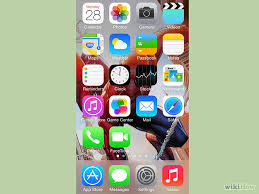
Have you ever wanted to capture something on your phone's screen? Maybe it's a hilarious text from a friend, or an interesting Facebook post, or you want to send someone an image to show her how to do something.
iPhone
Press and hold the Home button along with the Sleep/Wake button. You should hear a shutter click. The screenshot will appear in your Camera Roll or Saved Photos section.
Android
Hold the Power and Volume Down buttons at the same time. The image is saved to the "Captured Images" folder in your Gallery app. That only works in Android 4.0 and higher, though. For Android 3.0, 2.3 or earlier, use an app like AirDroid.
2. Block calls and texts

Have you ever had someone who just won't stop calling or texting you, even after you asked nicely? Here's how to block him.
iPhone
To block calls on an iPhone with iOS 7 or later, open the Phone or FaceTime app. If the person is already a contact, tap his name, scroll to the bottom of the page and tap Block This Caller. Then tap Block Contact.
If the person isn't a contact, tap the Info button, then scroll to the bottom of the page and tap Block this Caller. Then tap Block Contact.
If you want to block texts, open the Messages app and tap a message from the person you want to block. Tap Contact in the upper right and then tap the Info button. Scroll to the bottom and tap Block this Caller. Then tap Block Contact.
You can edit your blocked contacts later at these locations:
Settings>>Phone>>Blocked
Settings>>Messages>>Blocked
Settings>>FaceTime>>Blocked
Android
On Android, go to Settings>>Call settings>>Call block. Under "Incoming calls" tap "Call block list" and then tap Create. You can enter a number, or tap the picture icon to find the number in your Contacts list or in your call logs.
If you don't see these steps or want more blocking options, check out these call- and text-blocking apps.
3. Use a real password
iPhone and Android both default to a 4-digit PIN for unlocking the phone. That's OK as long as you don't use something simple like 0000 or 1234. However, I know some people who want even more security.
iPhone
To set a real password on an iPhone, go to Settings>>Passcode. From there, swipe off the option that says Simple Passcode. Here, you can set your passcode with letters and special characters for better phone security.
Android
Go to Settings>>Lock screen and tap Screen lock. You can set what level of security you want, from a simple swipe to a password. Select Password and type in the password that you want. It should have a mix of letters, numbers and special characters to be really safe.
4. See text more easily
Having a hard time reading things on your phone's small screen? Bump up the font size to something a bit easier to see.
iPhone
Go to Settings>>General>>Accessibility and turn on Bold Text and Larger Text. You can choose either one or both, depending on your preferences. You will need to restart your phone for Bold Text to take effect.
Android
Go to Settings>>Accessibility. Under Vision, tap Font size and set it to Large. Some phones include an even larger Huge option.
5. Read things out loud
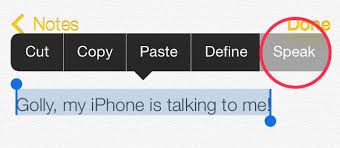
Want to keep your eyes off your phone for a bit? Have it read things to you out loud.
iPhone
Go to Settings>>General>>Accessibility and turn on VoiceOver. You have the option to practice with VoiceOver, set the speaking rate and more.
You will need to do some playing around to get used to it. For example you can touch and drag your fingers around the home screen to have it read what's there. Double tap to activate an app, while one tap will give you details about it.
VoiceOver will read directions to you in Maps, have your camera tell you how many people are in your shot, and get spoken photo descriptions. You can also handwrite notes and letters on the screen and have VoiceOver translate your messages into text for Mail and other apps.
Android
Go to Settings>>Accessibility and tap TalkBack. If you don't see it, you can download it from the Google Play store.
Turn it on and your phone will read whatever you touch on the screen and incoming notifications. Hint: To perform a regular swipe gesture, you have to use two fingers instead of one.
To adjust your TalkBack settings, go to Settings>>Accessibility and tap Text-to-Speech options. You can adjust the voice engine and speed rate.
Then go to Settings and turn on Hands-free mode. This will tell you who is calling or messaging.
6. Customize alert vibration patterns
You've set a custom ringtone for each of your contacts, but that doesn't help when you have your phone on vibrate. Fortunately, you can create custom vibration patterns as well.
iPhone
Go to Settings>>Sounds>>Ringtone>>Vibration. You can tap out patterns to record. Or, you can go into your contacts list and hit Edit and select the Vibration option for each contact.
Android
Go to Contacts and tap on a contact name. Under Vibration Pattern, tap Default and choose a preset pattern. Or tap the Create button and tap on the screen to create your own pattern.
If you don't have this built in, there are third-party apps like Vybe that can do this as well.
7. Flash camera LED for notifications
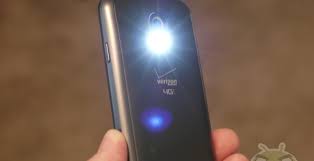
Need a quiet alert about notifications and don't want to use vibrate? Have notifications trigger your phone's LED camera flash instead. Just make sure you turn this off or keep your phone hidden when you go to the movies.
iPhone
Go to Settings>>General>> Accessibility and turn on "LED Flash for Alerts." Now every time you get a notification, your phone's rear camera will flash.
Android
Go to Settings>>Accessibility and turn on "Flash notification."
8. Better ways to take pictures
Tapping your phone's screen to take a picture sounds good in theory, but in practice it can make shots a little shaky. Here are some better options.
iPhone
Point your camera and press the phone’s Volume Up button.
Android
Open the camera app and tap the gear to see the settings. Scroll down to Voice control and turn it on. Now you can take pictures with the commands "Capture," "Shoot," "Smile" and "Cheese."
9. Take multiple pictures at once
If you're taking pictures of a moving object, squirming kid or people who tend to blink, you often want to take a bunch of pictures at once.
iPhone 5, 5s, and 5c
Open the Camera app. Tap and hold the shutter release button on the screen – or press and hold the Volume Up button – and the camera will start taking multiple pictures. Release the button when you want to stop.
The iPhones can take up to 10 pictures a second. It will group the photos for you automatically so you can quickly find the best ones.
Android
Open the Camera app. Tap the gear icon to open the settings and turn Burst Shot on. Then tap and hold the shutter release button and the phone will take multiple images until you release the button – or it hits the preset limit for your phone. The photos will be grouped for you in your gallery.
10. Turn off music automatically
A lot of people use their phone to listen to music as they go to sleep, or as they're doing a project. But you don't want it running forever and draining your battery.
iPhone
Go to the Clock app and click on "Timer," then "When Timer Ends." From here, scroll all the way down to the bottom of the screen and select "Stop Playing."
Android
Open the music player and go to Settings. Look for "Music auto off" and set it to however long you want the music to play. There are also third-party apps like Sleep Timer available.
Lumbering around on his barky limbs, sprouting flowers and even dancing in a pot, one of the stars of the film "Guardians of the Galaxy" bizarrely blends the plant and animal kingdoms. "Groot," awalking, talking tree, seems to defy nature but how outlandish is the idea of a plant-animal hybrid?
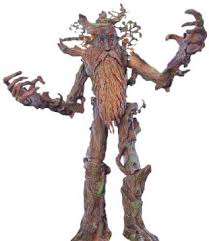
. Some scientists even say Earth's biology suggests the possibility of "thinking plants" somewhere in the universe.Plants that can smell and animals that regenerate show that animal and vegetable kingdoms may not be as far apart as they first appear.
Here, experts tell how Groot-like blending could occur, and some reasons it couldn't. [Science Fact or Fiction? The Plausibility of 10 Scintific-Fiction Concepts]
Plant sight, plant hearing

In the film, Groot clearly hears, sees, feels and talks (albeit, only three words, "I am Groot"). While one would be hard-pressed to find a talking vegetable on Earth, the idea of communicating and sensing plants is not at all outlandish,
In fact, plants have a much richer, more dynamic life than most people give the leafy beings credit for, Chamovitz said. "We think of plants as un-living, because they're unmoving," Chamovitz said. "The strong scientific evidence is that plants can do everything other than hearing."
They respond to chemicals, with lock-and-key mechanisms that resemble how animals smell. Plants have specific photoreceptors, which are proteins that respond to different wavelengths of light. They "know" when they're being touched, Simon Gilroy, a professor of botany at the University of Wisconsin-Madison, told Live Science.
Plants also have proprioception, or a sense of their location in space, Chamovitz said, which is why they can tell when they're planted upside-down.
Some plants can even "hear," able to distinguish the vibration patterns made by different chewing caterpillars, according to a study detailed this summer in the journal Oecologia, Gilroy said. (Decades-old claims that plants can "hear music," however, have little to no scientific support, he added.)
This plant sensing may not seem evident after all, plants don't scream in pain or comment on Van Gogh's use of color. But senses serve the same function in plants as they do in animals: Plants take in information, which travels through the plant body and causes some sort of response, Chamovitz said. [In Photos: Animals That Mimic Plants]
The familiar scene of houseplants growing toward the window, for example, shows how plants sense and respond to light. When part of a plant gets eaten, that causes distress chemicals to propagate through the plant, which responds with chemical changes to make itself less tasty to the predator, Gilroy said.
Not only can plants send signals within their own "bodies," but those signals can also influence other plants. In other words, they communicate, Chamovitz said. A disease or pest infestation in a neighboring plant sends out chemical signals that cause nearby plants to respond. "They can smell when neighbors are sick," Chamovitz said. "It gives off a chemical, so the plant defends itself."
Researchers have also shown corn seedlings lean toward sounds with a 220-Hertz frequency, the same tune emitted by the plants' roots, and chili seedlings grow quicker when they sense a fennel plant is growing nearby.
Moving but a bit slowly

Groot does more than just sense and communicate, though. He also moves around. This woody best friend to a talking raccoon shifts around on mobile stumps and lifts alien bullies up by their nostrils.
"Thinking about it, the feature that really isn't plantlike about Groot is the speed of the movement," Gilroy said.
Plants, for the most part, simply can't move that fast. Animals have "squishy cells" that can move past one another, making muscles feasible, Gilroy said. But a hard wall encloses each plant cell, and neighboring cells are glued together into a rigid grid.
"Things like muscles are impossible with how plants are set up," he said.
Moreover, a plant's entire body-plan centers upon staying put, so they can maximize photosynthesis with networks of branches and roots. Chamovitz calls "rootedness" the primary principle of plant biology.
Plants do make movements, however they just do it by growing, Gilroy said. For example, they "move" toward the sunlight by elongating cells on the dark side of the stem. "Plants grow through the environment," Gilroy said.
Due to some clever mechanisms, a few notable species buck the rule of the slow-moving plant. The famous Venus flytrap shuts its jaws rapidly by essentially "growing them shut," Gilroy said. Acid released at the flytrap's hinge softens cell walls and makes them expand quickly. [Image Gallery: Carnivorous Plants]
Finally, plants have to stay put because movement burns so much energy
photosynthesis simply can't power animal-style activity, which is why animals eat plants and other animals. To move around like Groot does on screen, such a tree creature would have to eat other things, too, Gilroy said.
Stem cells and Groot

Despite his (relatively) quick movements, Groot still maintains some plantlike characteristics. Capable of unlimited growth and regeneration, he grabs an out-of-reach battery by simply growing taller. His lopped-off arms return, and there's even a bit in the movie about replanting a Groot "cutting."
Clearly, the movie speeds up such vegetable growth, but real-life plants can indeed keep growing in ways animals can't, Ed Rayburn, an extension specialist and forage agronomist for West Virginia University, told Live Science. Those plant species capable of "unlimited growth" can keep going and going "for what, to humans, seems like forever," he said. And plants commonly regenerate lost limbs.
Those abilities derive from the way plants are structured and their access to stem cells.
Arranged in modular body plans, plants can grow limbs in different directions and add secondary limbs in a fractal pattern. Animals, by contrast, grow to a predetermined size and shape, and much of that happens in the womb, Gilroy said.
"We cram all our development into as short a time as possible," Gilroy said. But since plants can't run, and so will inevitably suffer damage, they have to keep growing throughout life, he said.
Plant stem cells are found in meristems, "small groups of cells that stay perpetually embryonic," Gilroy said. Located at stem and root tips, these plant stem cells are pluripotent, meaning they can develop into any type of plant cell. After injury, any plant cell can revert to similar pluripotency.
Animals, by contrast, lack meristems, and stem cells are much harder to come by, as shown by the difficulties faced by cloning efforts, Rayburn said. Some animals do approach plantlike regenerative growth, but usually those with simple body plans, like the planarian worm, Gilroy said.
plants that are called Intelligent plants?
Plant communication even has some researchers in the new field of plant neurobiology considering the potential for leafy intelligence. Alien worlds, some scientists say, could theoretically birth sentient plants.
But, Chamovitz said, such green thinkers would have to change the core trait of plants their rootedness. Animals developed thought because of their "searching" strategy for finding food, he told Forbes. Alien tree-thinkers would have to incorporate movement, perhaps with "some type of root system that can push itself out of the ground, take three steps forward and then re-root," he told Forbes.
As for creating plant-animal hybrids here on Earth, that's most likely to happen in a geneticist's lab. It's theoretically possible, given the right gene transfers, to give people a coating of green, photosynthetic skin. To actually make much use of such a feature, however, people would have to grow a canopy of leaves.


