You see someone do something extraordinary with his or her phone that you did not know was even possible.You’ve had your smartphone for a while, but let’s face it: You’ve never read the manual. You take great pride that you know how to use it, and then it happens.
Friends don’t let friends have smartphone skill envy. Here are some of my favorite secrets buried in your phone settings that you probably don't know, but will use now.
1. Take a screenshot
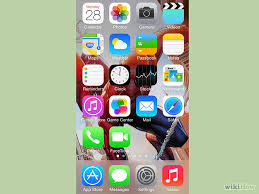
Have you ever wanted to capture something on your phone's screen? Maybe it's a hilarious text from a friend, or an interesting Facebook post, or you want to send someone an image to show her how to do something.
iPhone
Press and hold the Home button along with the Sleep/Wake button. You should hear a shutter click. The screenshot will appear in your Camera Roll or Saved Photos section.
Android
Hold the Power and Volume Down buttons at the same time. The image is saved to the "Captured Images" folder in your Gallery app. That only works in Android 4.0 and higher, though. For Android 3.0, 2.3 or earlier, use an app like AirDroid.
2. Block calls and texts

Have you ever had someone who just won't stop calling or texting you, even after you asked nicely? Here's how to block him.
iPhone
To block calls on an iPhone with iOS 7 or later, open the Phone or FaceTime app. If the person is already a contact, tap his name, scroll to the bottom of the page and tap Block This Caller. Then tap Block Contact.
If the person isn't a contact, tap the Info button, then scroll to the bottom of the page and tap Block this Caller. Then tap Block Contact.
If you want to block texts, open the Messages app and tap a message from the person you want to block. Tap Contact in the upper right and then tap the Info button. Scroll to the bottom and tap Block this Caller. Then tap Block Contact.
You can edit your blocked contacts later at these locations:
Settings>>Phone>>Blocked
Settings>>Messages>>Blocked
Settings>>FaceTime>>Blocked
Android
On Android, go to Settings>>Call settings>>Call block. Under "Incoming calls" tap "Call block list" and then tap Create. You can enter a number, or tap the picture icon to find the number in your Contacts list or in your call logs.
If you don't see these steps or want more blocking options, check out these call- and text-blocking apps.
3. Use a real password
iPhone and Android both default to a 4-digit PIN for unlocking the phone. That's OK as long as you don't use something simple like 0000 or 1234. However, I know some people who want even more security.
iPhone
To set a real password on an iPhone, go to Settings>>Passcode. From there, swipe off the option that says Simple Passcode. Here, you can set your passcode with letters and special characters for better phone security.
Android
Go to Settings>>Lock screen and tap Screen lock. You can set what level of security you want, from a simple swipe to a password. Select Password and type in the password that you want. It should have a mix of letters, numbers and special characters to be really safe.
4. See text more easily
Having a hard time reading things on your phone's small screen? Bump up the font size to something a bit easier to see.
iPhone
Go to Settings>>General>>Accessibility and turn on Bold Text and Larger Text. You can choose either one or both, depending on your preferences. You will need to restart your phone for Bold Text to take effect.
Android
Go to Settings>>Accessibility. Under Vision, tap Font size and set it to Large. Some phones include an even larger Huge option.
5. Read things out loud
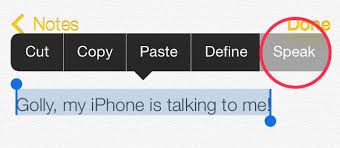
Want to keep your eyes off your phone for a bit? Have it read things to you out loud.
iPhone
Go to Settings>>General>>Accessibility and turn on VoiceOver. You have the option to practice with VoiceOver, set the speaking rate and more.
You will need to do some playing around to get used to it. For example you can touch and drag your fingers around the home screen to have it read what's there. Double tap to activate an app, while one tap will give you details about it.
VoiceOver will read directions to you in Maps, have your camera tell you how many people are in your shot, and get spoken photo descriptions. You can also handwrite notes and letters on the screen and have VoiceOver translate your messages into text for Mail and other apps.
Android
Go to Settings>>Accessibility and tap TalkBack. If you don't see it, you can download it from the Google Play store.
Turn it on and your phone will read whatever you touch on the screen and incoming notifications. Hint: To perform a regular swipe gesture, you have to use two fingers instead of one.
To adjust your TalkBack settings, go to Settings>>Accessibility and tap Text-to-Speech options. You can adjust the voice engine and speed rate.
Then go to Settings and turn on Hands-free mode. This will tell you who is calling or messaging.
6. Customize alert vibration patterns
You've set a custom ringtone for each of your contacts, but that doesn't help when you have your phone on vibrate. Fortunately, you can create custom vibration patterns as well.
iPhone
Go to Settings>>Sounds>>Ringtone>>Vibration. You can tap out patterns to record. Or, you can go into your contacts list and hit Edit and select the Vibration option for each contact.
Android
Go to Contacts and tap on a contact name. Under Vibration Pattern, tap Default and choose a preset pattern. Or tap the Create button and tap on the screen to create your own pattern.
If you don't have this built in, there are third-party apps like Vybe that can do this as well.
7. Flash camera LED for notifications
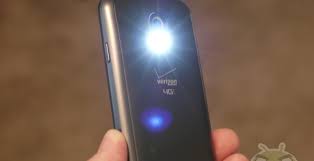
Need a quiet alert about notifications and don't want to use vibrate? Have notifications trigger your phone's LED camera flash instead. Just make sure you turn this off or keep your phone hidden when you go to the movies.
iPhone
Go to Settings>>General>> Accessibility and turn on "LED Flash for Alerts." Now every time you get a notification, your phone's rear camera will flash.
Android
Go to Settings>>Accessibility and turn on "Flash notification."
8. Better ways to take pictures
Tapping your phone's screen to take a picture sounds good in theory, but in practice it can make shots a little shaky. Here are some better options.
iPhone
Point your camera and press the phone’s Volume Up button.
Android
Open the camera app and tap the gear to see the settings. Scroll down to Voice control and turn it on. Now you can take pictures with the commands "Capture," "Shoot," "Smile" and "Cheese."
9. Take multiple pictures at once
If you're taking pictures of a moving object, squirming kid or people who tend to blink, you often want to take a bunch of pictures at once.
iPhone 5, 5s, and 5c
Open the Camera app. Tap and hold the shutter release button on the screen – or press and hold the Volume Up button – and the camera will start taking multiple pictures. Release the button when you want to stop.
The iPhones can take up to 10 pictures a second. It will group the photos for you automatically so you can quickly find the best ones.
Android
Open the Camera app. Tap the gear icon to open the settings and turn Burst Shot on. Then tap and hold the shutter release button and the phone will take multiple images until you release the button – or it hits the preset limit for your phone. The photos will be grouped for you in your gallery.
10. Turn off music automatically
A lot of people use their phone to listen to music as they go to sleep, or as they're doing a project. But you don't want it running forever and draining your battery.
iPhone
Go to the Clock app and click on "Timer," then "When Timer Ends." From here, scroll all the way down to the bottom of the screen and select "Stop Playing."
Android
Open the music player and go to Settings. Look for "Music auto off" and set it to however long you want the music to play. There are also third-party apps like Sleep Timer available.
Friends don’t let friends have smartphone skill envy. Here are some of my favorite secrets buried in your phone settings that you probably don't know, but will use now.
1. Take a screenshot
Have you ever wanted to capture something on your phone's screen? Maybe it's a hilarious text from a friend, or an interesting Facebook post, or you want to send someone an image to show her how to do something.
iPhone
Press and hold the Home button along with the Sleep/Wake button. You should hear a shutter click. The screenshot will appear in your Camera Roll or Saved Photos section.
Android
Hold the Power and Volume Down buttons at the same time. The image is saved to the "Captured Images" folder in your Gallery app. That only works in Android 4.0 and higher, though. For Android 3.0, 2.3 or earlier, use an app like AirDroid.
2. Block calls and texts
Have you ever had someone who just won't stop calling or texting you, even after you asked nicely? Here's how to block him.
iPhone
To block calls on an iPhone with iOS 7 or later, open the Phone or FaceTime app. If the person is already a contact, tap his name, scroll to the bottom of the page and tap Block This Caller. Then tap Block Contact.
If the person isn't a contact, tap the Info button, then scroll to the bottom of the page and tap Block this Caller. Then tap Block Contact.
If you want to block texts, open the Messages app and tap a message from the person you want to block. Tap Contact in the upper right and then tap the Info button. Scroll to the bottom and tap Block this Caller. Then tap Block Contact.
You can edit your blocked contacts later at these locations:
Settings>>Phone>>Blocked
Settings>>Messages>>Blocked
Settings>>FaceTime>>Blocked
Android
On Android, go to Settings>>Call settings>>Call block. Under "Incoming calls" tap "Call block list" and then tap Create. You can enter a number, or tap the picture icon to find the number in your Contacts list or in your call logs.
If you don't see these steps or want more blocking options, check out these call- and text-blocking apps.
3. Use a real password
iPhone and Android both default to a 4-digit PIN for unlocking the phone. That's OK as long as you don't use something simple like 0000 or 1234. However, I know some people who want even more security.
iPhone
To set a real password on an iPhone, go to Settings>>Passcode. From there, swipe off the option that says Simple Passcode. Here, you can set your passcode with letters and special characters for better phone security.
Android
Go to Settings>>Lock screen and tap Screen lock. You can set what level of security you want, from a simple swipe to a password. Select Password and type in the password that you want. It should have a mix of letters, numbers and special characters to be really safe.
4. See text more easily
Having a hard time reading things on your phone's small screen? Bump up the font size to something a bit easier to see.
iPhone
Go to Settings>>General>>Accessibility and turn on Bold Text and Larger Text. You can choose either one or both, depending on your preferences. You will need to restart your phone for Bold Text to take effect.
Android
Go to Settings>>Accessibility. Under Vision, tap Font size and set it to Large. Some phones include an even larger Huge option.
5. Read things out loud
Want to keep your eyes off your phone for a bit? Have it read things to you out loud.
iPhone
Go to Settings>>General>>Accessibility and turn on VoiceOver. You have the option to practice with VoiceOver, set the speaking rate and more.
You will need to do some playing around to get used to it. For example you can touch and drag your fingers around the home screen to have it read what's there. Double tap to activate an app, while one tap will give you details about it.
VoiceOver will read directions to you in Maps, have your camera tell you how many people are in your shot, and get spoken photo descriptions. You can also handwrite notes and letters on the screen and have VoiceOver translate your messages into text for Mail and other apps.
Android
Go to Settings>>Accessibility and tap TalkBack. If you don't see it, you can download it from the Google Play store.
Turn it on and your phone will read whatever you touch on the screen and incoming notifications. Hint: To perform a regular swipe gesture, you have to use two fingers instead of one.
To adjust your TalkBack settings, go to Settings>>Accessibility and tap Text-to-Speech options. You can adjust the voice engine and speed rate.
Then go to Settings and turn on Hands-free mode. This will tell you who is calling or messaging.
6. Customize alert vibration patterns
You've set a custom ringtone for each of your contacts, but that doesn't help when you have your phone on vibrate. Fortunately, you can create custom vibration patterns as well.
iPhone
Go to Settings>>Sounds>>Ringtone>>Vibration. You can tap out patterns to record. Or, you can go into your contacts list and hit Edit and select the Vibration option for each contact.
Android
Go to Contacts and tap on a contact name. Under Vibration Pattern, tap Default and choose a preset pattern. Or tap the Create button and tap on the screen to create your own pattern.
If you don't have this built in, there are third-party apps like Vybe that can do this as well.
7. Flash camera LED for notifications
Need a quiet alert about notifications and don't want to use vibrate? Have notifications trigger your phone's LED camera flash instead. Just make sure you turn this off or keep your phone hidden when you go to the movies.
iPhone
Go to Settings>>General>> Accessibility and turn on "LED Flash for Alerts." Now every time you get a notification, your phone's rear camera will flash.
Android
Go to Settings>>Accessibility and turn on "Flash notification."
8. Better ways to take pictures
Tapping your phone's screen to take a picture sounds good in theory, but in practice it can make shots a little shaky. Here are some better options.
iPhone
Point your camera and press the phone’s Volume Up button.
Android
Open the camera app and tap the gear to see the settings. Scroll down to Voice control and turn it on. Now you can take pictures with the commands "Capture," "Shoot," "Smile" and "Cheese."
9. Take multiple pictures at once
If you're taking pictures of a moving object, squirming kid or people who tend to blink, you often want to take a bunch of pictures at once.
iPhone 5, 5s, and 5c
Open the Camera app. Tap and hold the shutter release button on the screen – or press and hold the Volume Up button – and the camera will start taking multiple pictures. Release the button when you want to stop.
The iPhones can take up to 10 pictures a second. It will group the photos for you automatically so you can quickly find the best ones.
Android
Open the Camera app. Tap the gear icon to open the settings and turn Burst Shot on. Then tap and hold the shutter release button and the phone will take multiple images until you release the button – or it hits the preset limit for your phone. The photos will be grouped for you in your gallery.
10. Turn off music automatically
A lot of people use their phone to listen to music as they go to sleep, or as they're doing a project. But you don't want it running forever and draining your battery.
iPhone
Go to the Clock app and click on "Timer," then "When Timer Ends." From here, scroll all the way down to the bottom of the screen and select "Stop Playing."
Android
Open the music player and go to Settings. Look for "Music auto off" and set it to however long you want the music to play. There are also third-party apps like Sleep Timer available.


